Heightmap — from my laser and UV printer to an app
06/16/2026 · Created by Björn Kindler
Most of my apps start from a workshop problem, not a market. Heightmap is the clearest example: I build things, and I kept needing one specific file I could not get cleanly.
The machines came first
I am a maker. Among other things I have a laser that can engrave relief — depth, not just lines — and a UV flatbed printer that can lay down ink in layers to build up a tactile surface. Both of them are happiest when you feed them a height map: a grayscale image where brightness means height. White is the top, black is the base, and the machine reads the grays as everything in between.
The file nobody hands you
The trouble is that a good height map from an ordinary photo is annoyingly hard to come by. You can fake it by desaturating an image, but brightness is not depth — a dark shirt is not “further away” than a pale face. What you actually want is the relief: the shape of the subject, estimated from the picture. The tools that do this well are either heavyweight 3D pipelines or cloud services you have to upload to. For a one-off relief of a family photo, both are too much.
So I built the missing tool
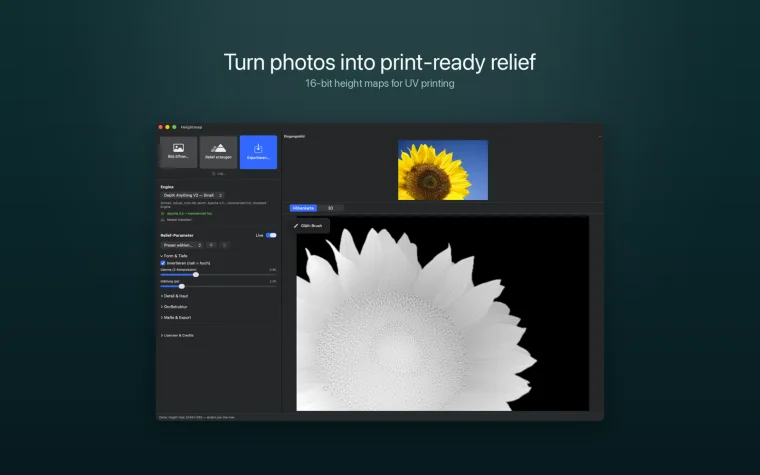
Heightmap estimates depth from a single photo with an on-device model — nothing leaves the Mac — and gives me controls that matter for fabrication rather than for looking pretty: gamma, smoothing, detail, and a large-structure compression that pulls the subject forward and flattens the background. A face-aware smoothing pass softens skin while keeping eyes and mouth crisp, and a local brush fixes rough spots by hand.
The output is the part I cared about most: 16-bit grayscale PNG or TIFF, where the raw values carry real height your RIP or slicer can trust — no 8-bit banding, no guessing. There is a JSON sidecar with height, base thickness, DPI and Z-layers, and a live 3D preview so I can see the relief before I commit material to it.
From my bench to the App Store
It started as a tool for my own laser and UV printer, and it turned out plenty of other makers want the same file — UV-DTF and flatbed prints, laser depth engraving, CNC bas-relief, 3D-printed reliefs. It is on theMac App Store now, a one-time purchase, with the depth model bundled so it works the moment you open it.