
RadianceView — a native splat viewer (and editor) for the Mac
06/21/2026 · Created by Björn Kindler
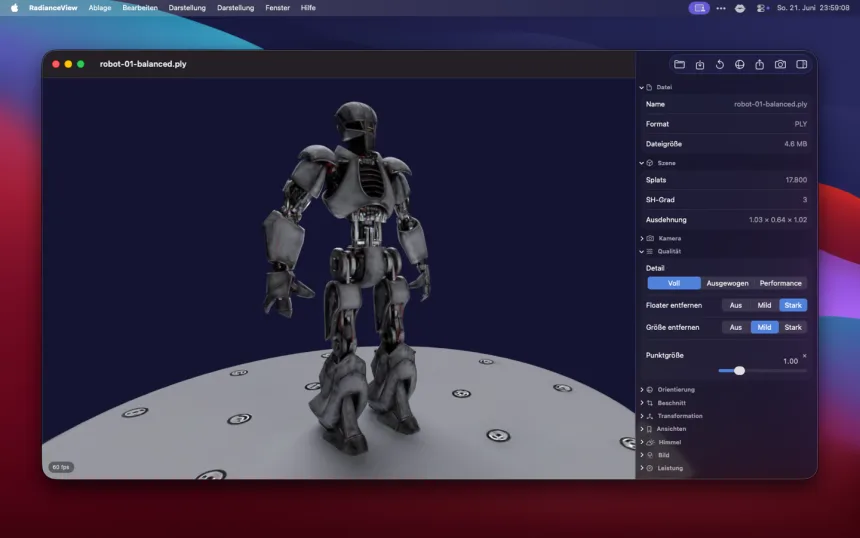
RadianceKit trains Gaussian splats. RadianceView is the other half of the loop: where you open a finished capture, tidy it up and export it. Here is why it became its own app, and the one bottleneck I had to fix before it felt good.
If you want the background on what Gaussian splatting even is, I wrote aprimer for Mac developers earlier. Short version: a splat scene is a few hundred thousand to a few million little translucent ellipsoids, and rendering it means sorting them back-to-front and drawing a lot of soft, overlapping quads.
Why a separate viewer
A trainer and a viewer want to be different programs. Training is a long, heavy, one-shot job; viewing is something you do constantly, with files from anywhere — a capture a client sends, a scene off the web, an export from another tool. RadianceView opens PLY (including the compressed SuperSplat / PlayCanvas variants), .splat and .spz, sets itself as the default app for PLY files, and adds a QuickLook preview so you can spacebar a splat in Finder like any other document.
The sort was the whole problem
Splatting lives or dies on the depth sort, and the first version was slow in a way the GPU profile made embarrassingly clear: the GPU was doing roughly four milliseconds of work while the CPU spent eighty milliseconds sorting. The renderer I started from sorted on a single CPU thread with a comparison sort — tens of milliseconds of O(n log n) on every camera move.
The fix was to replace the comparison sort with an LSD radix sort over a sortable 32-bit key. Radix sort is O(n) — it bins by byte instead of comparing pairs — and the eighty milliseconds dropped to roughly ten. That is the difference between a viewer that lurches when you orbit and one that just follows your hand.
From viewer to light editor
Once it rendered smoothly, the obvious next step was the cleanup every real capture needs. Splat scenes come out of training with stray floaters, oversized blobs near the camera, and a tilt from however the drone or phone was held. So RadianceView grew a set of non-destructive tools: hide floaters and oversized splats, a world-fixed crop box you rotate the object through, move / rotate / scale to straighten a scene, and colour grading — exposure, contrast, saturation, a procedural sky. The cleaned scene exports back out as PLY.
Free to view, one unlock to export
Viewing, cleaning up and grading are free. Exporting PLY and saving projects sit behind a single one-time Pro unlock — no subscription. The app is on theMac App Store, Apple-silicon native, sandboxed, in 18 languages. If you train your own splats in RadianceKit, this is where they go to get tidy.